Spend less time searching and more time practising. The updated Latest Questions experience in LingoLeap helps you find unfinished questions, skip content you have already practised, browse around your goals, and check a question's recorded exam appearances.
Open TOEFL Speaking and choose Latest Questions under Question source to explore the updated question bank.
Keep unfinished questions in view
Turn on Not completed only to filter the list to questions you have not completed. This is useful when you have already worked through part of the bank and want to choose from the remaining questions yourself.
The control highlights when selected, so you can see when the filter is active. Select it again to turn it off.
Let Pick for me help you choose
If you would rather get help choosing your next question, use Pick for me. The selection bar explains what it does: Skip practiced and duplicate content.
You can also see your completion progress in question groups beside the button. Use Not completed only when you want to choose from a filtered list, or Pick for me when you want LingoLeap to help with the selection.
Browse by date, topic, or set
Choose the view that matches today's practice goal:
| Your goal | View | Where to start |
|---|---|---|
| Catch up on recently added content | By date | Select Just added, or choose a month. Use Earlier for older months. |
| Focus on one topic | By topic | Explore cards such as Personal Experience, Campus Facilities, and Daily Decisions. |
| Use a set-based layout | By set | Switch from date or topic browsing to the set-based view. |
For example, to work on describing your experiences, choose By topic, open Personal Experience, and select a question to practise. Subject filters such as Everyday Campus and Business Economics help you narrow your browsing further.
The browsing view and practice mode are separate controls. By set changes how you browse; choose Section Mock Test for a section mock test. For individual questions, use Individual Practice.
Check how often a question has been reported
Some question cards show a badge such as Seen 5 times. Select the badge to open Question information and its Repeat history panel. Under Exam dates, you can see the recorded dates behind the count.
For example, Environmental Practices shows Seen 5 times and Reported on 5 distinct exam days. Its history lists November 14, October 17, September 23, July 4, and March 14, 2026.
You can also choose Most repeated to browse questions in descending order of their recorded appearance counts. These records describe past reports; they do not predict what will appear on a future exam.
Try it in TOEFL Speaking
- Open TOEFL Speaking.
- Under Question source, select Latest Questions.
- Choose Individual Practice, then select Listen and Repeat, Take an Interview, or All under Task.
- Use Not completed only, Pick for me, or a browsing view to decide what to practise next.
Use Search questions to look up a question. Question cards may show Practice or Get Premium, depending on access.
If the app opens in another language, use the settings icon at the top right and select English under Language.
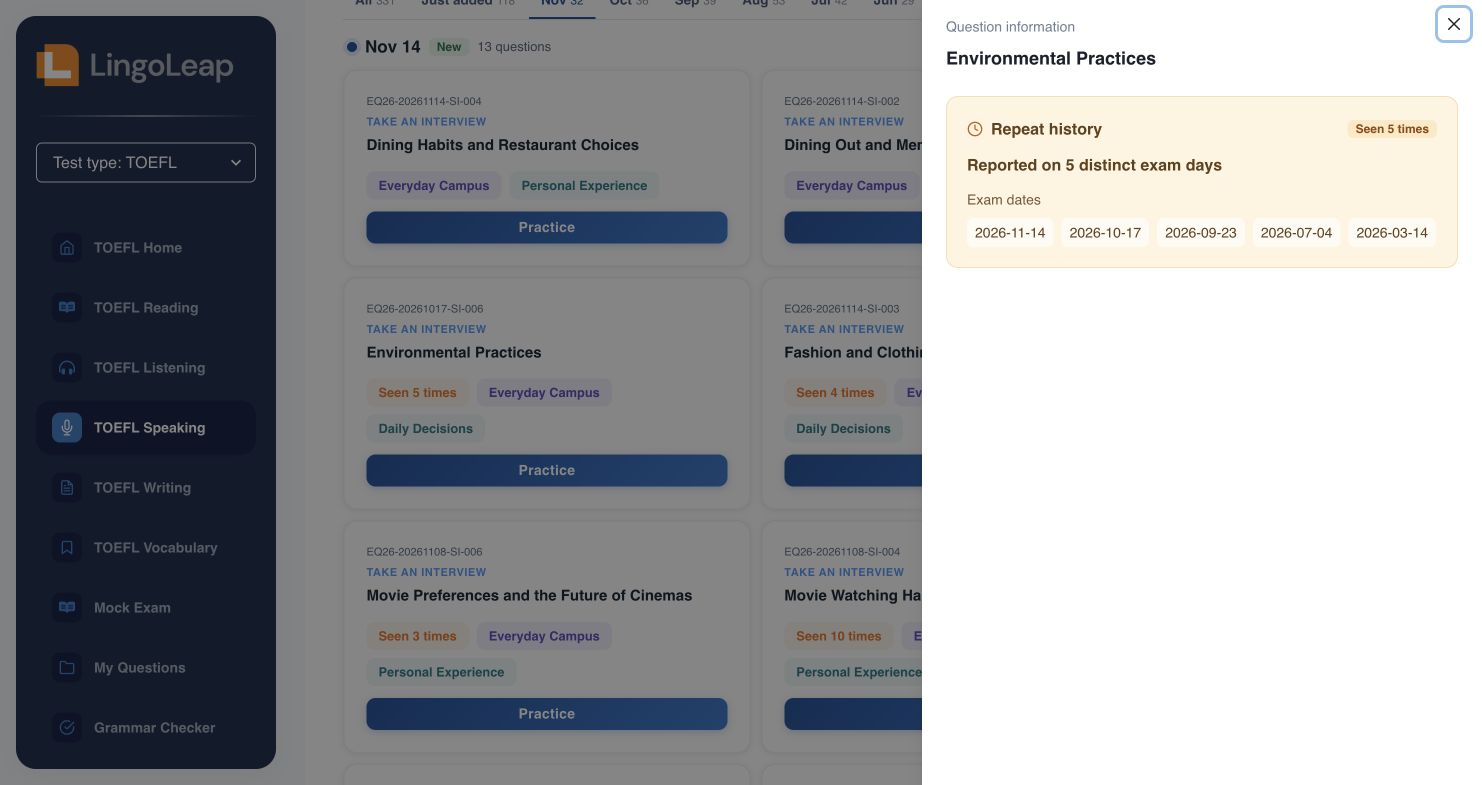
Real English overseas interface, checked 20 November 2026. The history records reported exam appearances; it does not predict future questions. This is practice material, not an official ETS question bank.
Open full-size image