Play screenshot carouselStop carousel · show static image
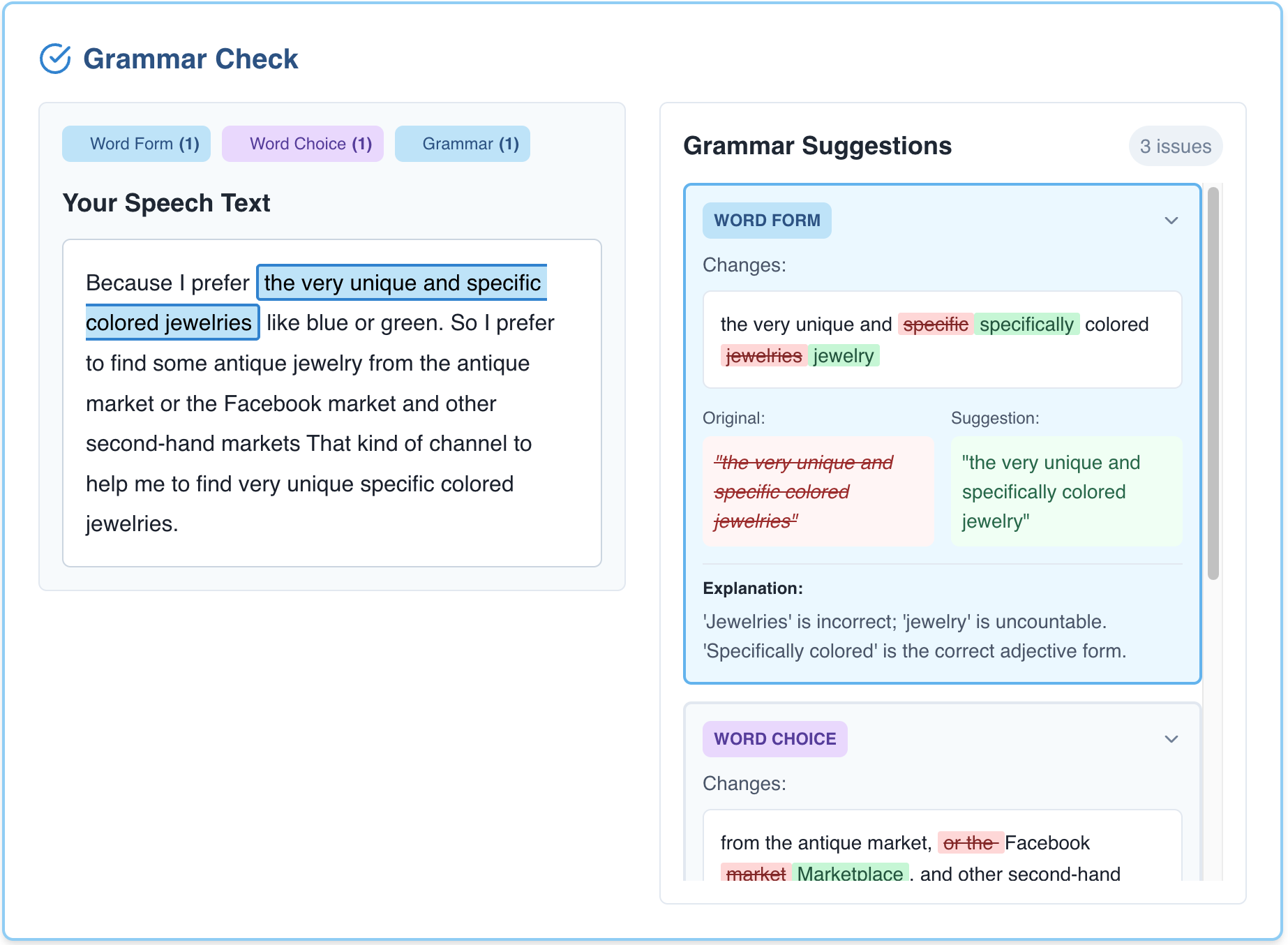
Start with the static Grammar Check image, or play the screenshot carousel above. Select Stop carousel to return to the static image. This is not a screen recording. These English public product illustrations show transcript and pronunciation analysis, followed by grammar suggestions. They are sample reports, not your personal result.
Static screenshots and text walkthrough
- Speech Analysis pairs a transcript with pronunciation feedback; percentages are analysis metrics.
- Grammar Check pairs original wording with suggested changes and explanations.
Find the right IELTS report
Open IELTS History. Use By time, By question, or the Section and Status filters to locate your attempt, then select View result. Check the task and the response before comparing two reports.
Read an IELTS band estimate
IELTS uses a 0–9 band scale. Official results report four section scores and an overall band. A LingoLeap estimate for one speaking or writing response does not establish your overall four-skill IELTS band.
Writing criteria cover task achievement (Task 1) or task response (Task 2), coherence and cohesion, lexical resource, and grammatical range and accuracy. Speaking criteria cover fluency and coherence, lexical resource, grammatical range and accuracy, and pronunciation. Use the comments relevant to your actual task; do not interpret IELTS using TOEFL’s 1–6 or task-level 0–5 scales.
See IELTS’s official scoring explanation. Practice estimates are not official examination scores and cannot be used as official results for applications.
Use the response and analysis together
- Submitted response
- Read your essay or listen to your recording first. For speech, compare the transcript with the audio before changing a word that may have been transcribed incorrectly.
- Band and criterion comments
- Read the score label and the task-specific comments. A single grammar fix does not demonstrate improvement across every IELTS criterion.
- Speech Analysis
- Use word and delivery feedback to decide what to replay. The percentages shown in the website’s feature illustration are analysis indicators, not IELTS band scores.
- Grammar Check
- The public IELTS example groups suggestions as Word Form, Word Choice and Grammar. Compare the original text with the proposed change and read its explanation.
- Suggested wording
- Treat a suggested answer as an example. Check that it preserves what you mean and answers the actual question.
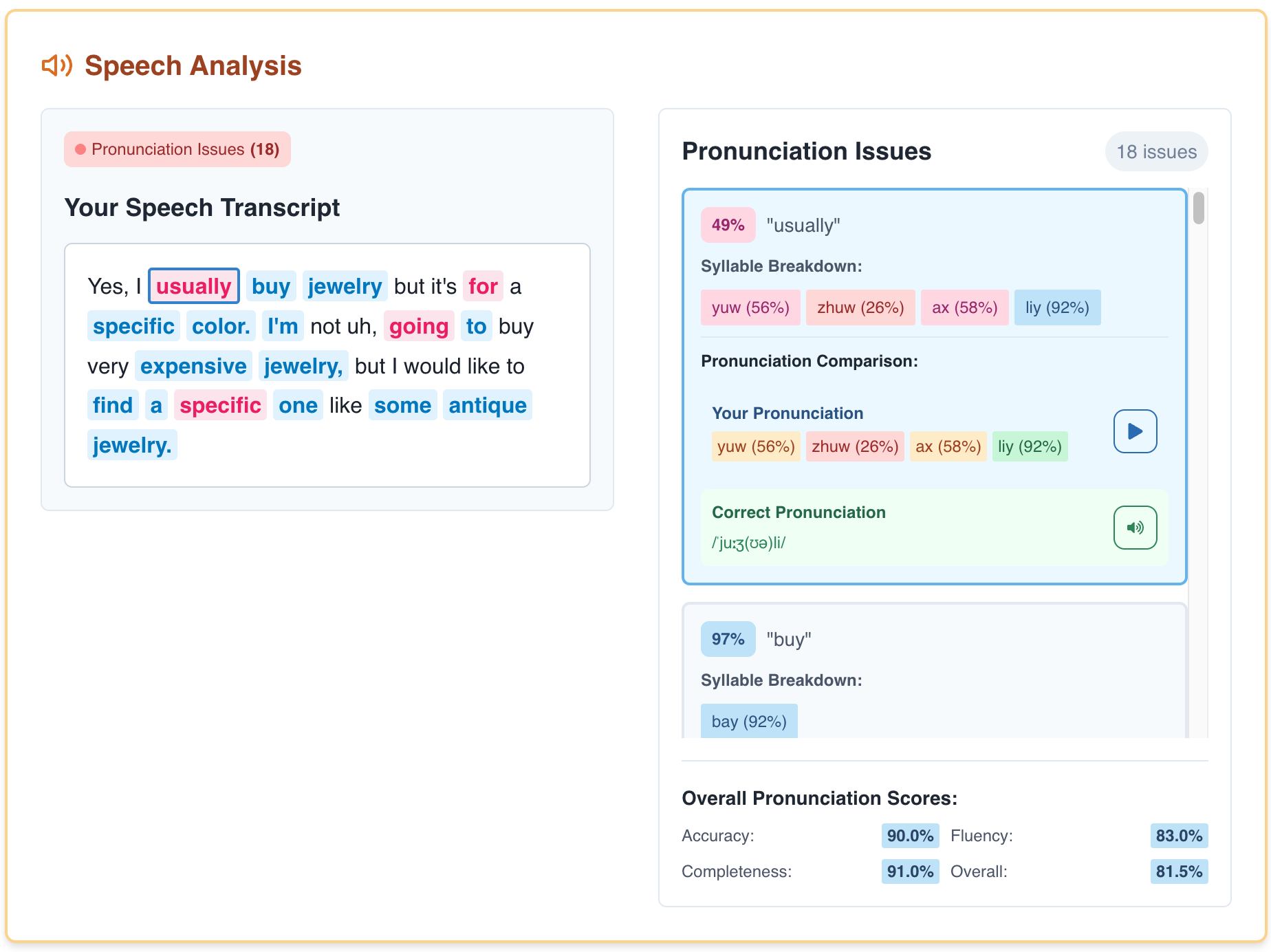
Start with a marked word in the transcript, replay your own audio and compare the pronunciation. Accuracy and fluency percentages in this feature illustration are not IELTS band scores.
Open full-size imageA real IELTS example: fix a noun form
The international IELTS website already shows a Grammar Check example containing “colored jewelries”. The suggestion changes the noun to “jewelry”. This is a word-form correction. Check that the suggested phrase preserves your intended meaning.
Original response
colored jewelries
Suggested revision
colored jewelry
Why it helpsIn this example, “jewelry” is an uncountable noun. Changing the noun form fixes this local grammar issue; it does not by itself establish a higher IELTS band.
Try this nextFind one noun-form suggestion in your transcript. Check the meaning, then use the corrected phrase in a new sentence aloud.
Short excerpt from the Grammar Check example already shown on the international IELTS website. Suggested wording, not a recorded second attempt.
Choose one action for your next attempt
- Choose one suggestion you understand, such as the noun form in the example.
- Practise it in a fresh sentence or short spoken response while keeping your meaning.
- On a later evaluated attempt, review the whole response and the relevant criterion comments again.
A suggested rewrite is not a resubmitted attempt. A different task, response or scoring judgement may produce a different estimate. No score increase or scoring-accuracy claim is established by this example.
Put it into practice
Open IELTS HistoryYour account and responses
Use My Account for account details. Read the international Privacy Policy for the published data terms, including its statements about content and model use. Contact support if you need clarification before submitting personal information.