Before you start
Sign in to the international app and choose Test type: IELTS. Check your selected task, question source and account access before starting. The sidebar includes IELTS Reading, Listening, Speaking, Writing and History.
For Speaking, use a quiet place and check your microphone and playback volume. Allow microphone access when the browser asks. For Writing, read the task and its word requirement before drafting. Review plans and credits before requesting paid evaluation.
Start an IELTS Speaking task
- Open IELTS Speaking. Choose a question source such as Latest Questions or Cambridge.
- Use Speaking part 1 or Speaking part 2&3 to find the relevant task. Select Practice on a question.
- On the Part 1 practice screen, use Answer to respond to the current question. The screen also offers Upload Recording and Next. Follow the recording and completion prompts for your selected task.
What to expect: your selected speaking questions and a recording workflow, followed by feedback when evaluation completes. Part 2&3 has its own task instructions; it is not a TOEFL interview. Review the transcript against your audio before using corrections.
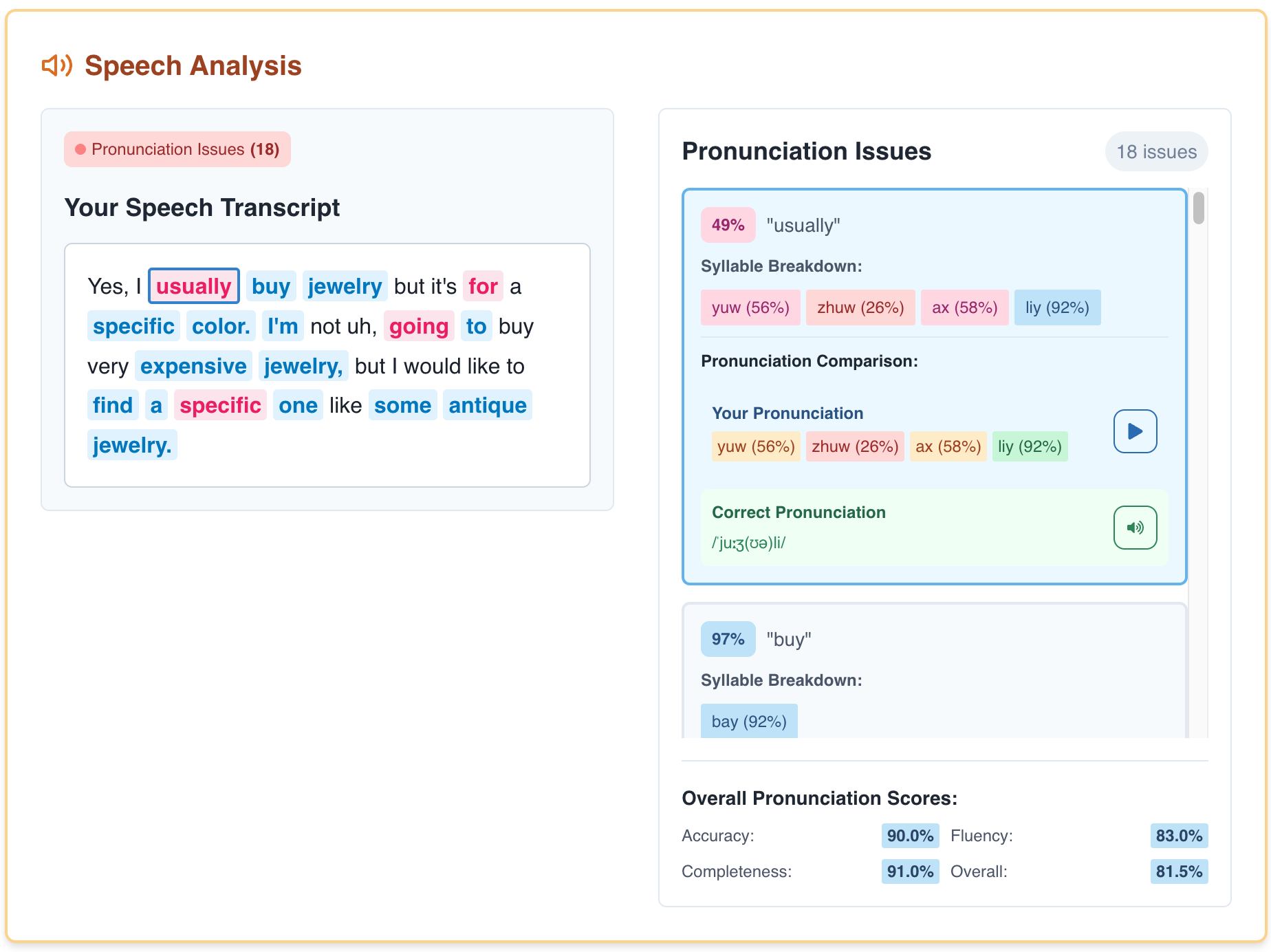
After evaluation, review the transcript alongside your recording. This IELTS website example shows how a selected word connects to pronunciation feedback. The percentages are analysis indicators, not IELTS bands.
Open full-size imageStart an IELTS Writing task
- Open IELTS Writing. Select Writing task 1 or Writing task 2 and choose Practice (or Practice Again for a previously completed question).
- The writing workspace may open in a new tab. Read the actual prompt and type your response in the answer area. The Task 2 workspace shows a word count, a 40-minute task instruction and a minimum of 250 words.
- Review your answer, then select AI Evaluation to request feedback. Check any account or credit requirement shown before confirming.
What to expect: evaluation of the response you submitted. Task 1 instructions depend on the selected question. Do not assume that an Academic chart task is a General Training letter, or that every task has Task 2’s word requirement.
Use your own question or study a model answer
Both IELTS Speaking and Writing have a Customized Question tab. Speaking offers Part 1 or Part 2&3; Writing lets you choose Writing Task 1 or Writing Task 2. Enter the complete prompt and select the matching task before continuing.
Generate Answers creates a model response for learning expressions and structure. In the custom Speaking form, target bands 6, 7, 8 and 9 guide the sample; they are not estimates of your own ability. The question cards also have Generate Answer.
AI Evaluation evaluates your own recording or essay. For custom Speaking, the form provides Answer and Upload Recording; in Writing, supply both the question and your answer. Generation and evaluation are separate requests. Check the selected service and usage message before submitting.
Teaching prompt: “Do you enjoy cooking?” is an authored example of a short Part 1 question, not a question-bank addition or a personal report. Use a sample to study the structure, close it, then answer from your own experience.
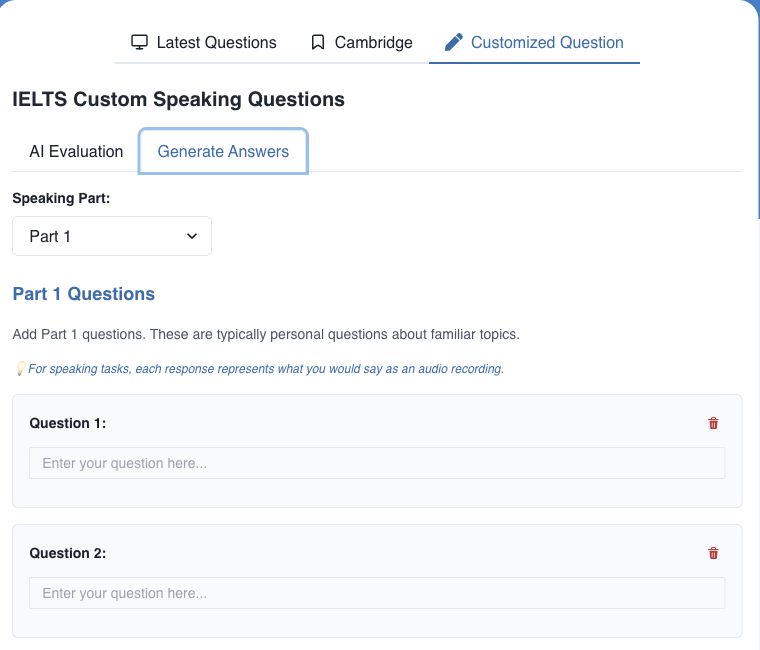
English overseas interface checked 20 November 2026. Choose your Speaking Part and enter the questions. Generate Answers creates a model response; AI Evaluation uses your own recording. This blank input form contains no personal response, and no generation was submitted.
Open full-size imageReading, Listening and full mocks
Some accounts can see separate IELTS Reading, IELTS Listening and IELTS Full Mock Test entries. Reading and Listening were visible in the inspected existing account, with Cambridge Reading parts 1–3 and Listening parts 1–4. These observations do not establish availability for a new account. Choose a listed task or set and read its instructions before starting. If the mock list is empty, return to a skill page for individual practice. Prepare sound for Listening and both sound and microphone for a mock that includes Speaking.
Use the task names and completion controls shown for IELTS. The presence of a mock entry does not mean that every set, exam type or account has the same coverage. Confirm the set’s skills and Academic or General Training suitability before treating it as a full rehearsal.
Find your IELTS practice result
Open History while IELTS is selected. Practice history can be viewed By time or By question, with Section and Status filters. Find your attempt and choose View result when available.
Read the IELTS scores and feedback guide, choose one suggestion and practise applying it. Use the result for your own completed attempt; an example shown on the website is not your personal report.
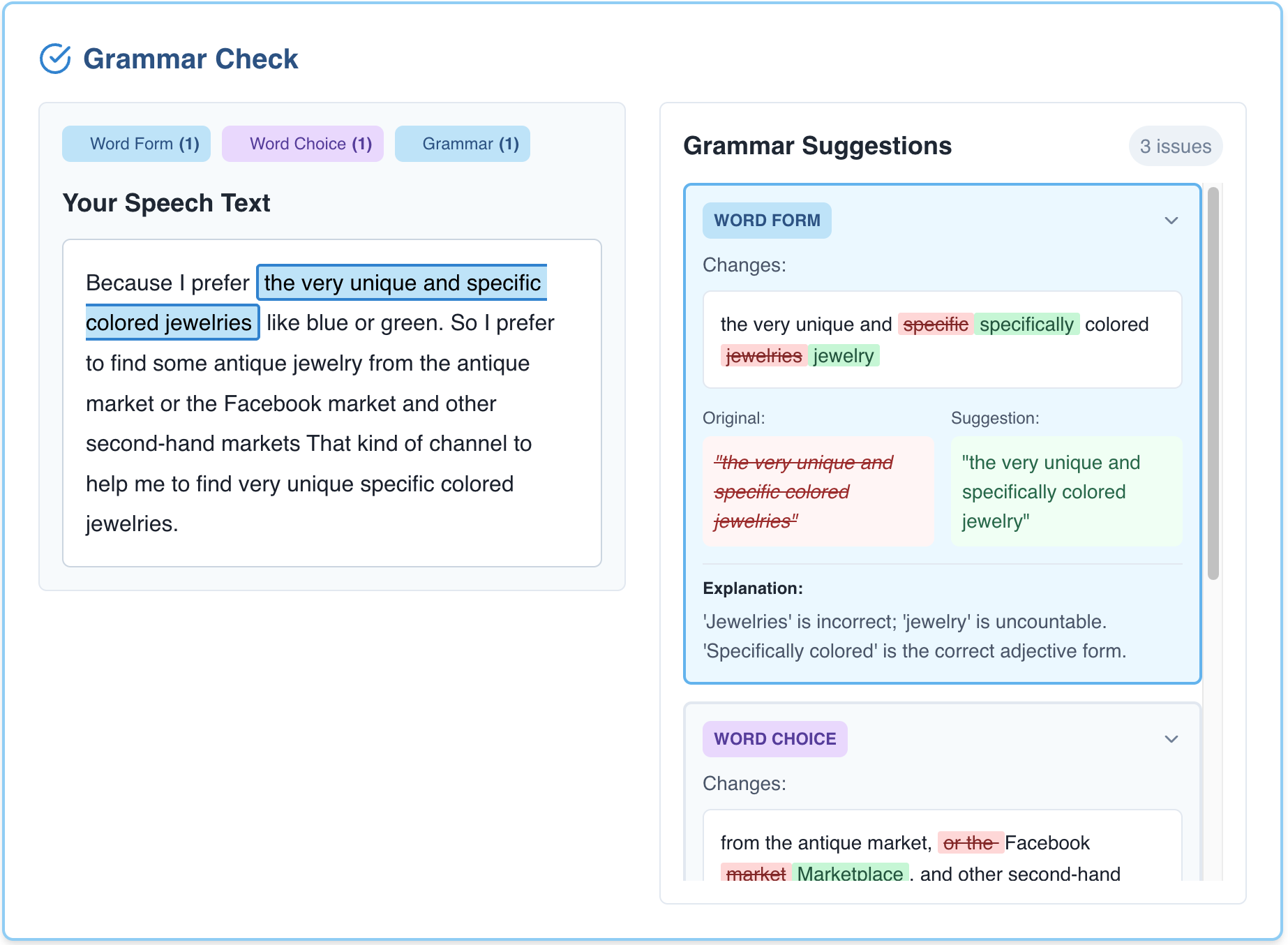
In the IELTS Grammar Check example, read your original wording, the proposed change and the explanation together. The scores and feedback guide below explains how to turn one correction into your next practice action.
Open full-size imagePut it into practice
Open IELTS practiceYour account and responses
Use My Account for account details. Read the international Privacy Policy for the published data terms, including its statements about content and model use. Contact support if you need clarification before submitting personal information.